Work orders

Field service work order software to close jobs on site

Photos, notes, readings, and parts go in as the work happens — attached to the unit they belong to, not typed up later from memory.

Founder-led · Running in production since 2019 · Built in Austin, TX

The whole job, captured while it happens

What the tech did, on what unit, with the proof attached.

Filled out on the phone, on site

Notes, parts, and photos go in while the tech is still standing at the unit — not written up from memory that night, or never.

Notes and parts, not just a checkbox

What was found, what was done, and what went in — recorded at the unit so the job can be billed and the next tech knows what happened.

Attached to the equipment

Every work order lands on the specific unit it was performed on, so the history builds itself instead of living in a filing cabinet.

Photos before and after

Condition on arrival, the failed part, the finished install. Attached to the job, timestamped, and visible to the office immediately.

The office sees it close

No waiting for paperwork to come back at the end of the week to find out what happened and what can be billed.

Works with no signal

Walk-ins, basements, and rooftops. The app keeps capturing and syncs the moment a connection returns — nothing is lost.

Every job, every stage

Scheduled, assigned, in progress, completed — at a glance.
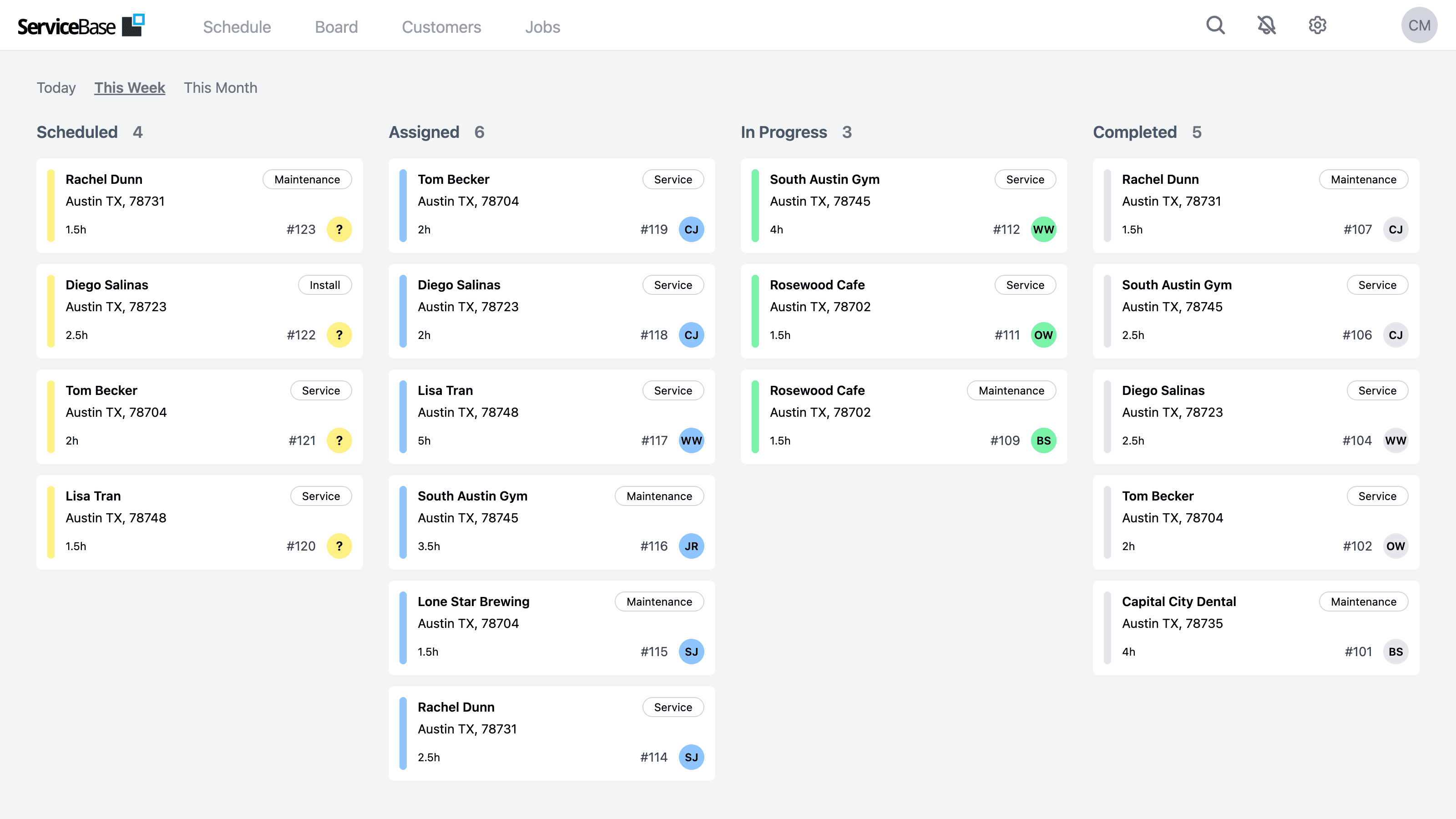
FIG 3.0 — Work Orders By Status
ServiceBase board showing commercial service work orders sorted by status and technician

Common questions

What is field service work order software?
It's how a job gets documented: what was wrong, what the tech did, which parts went in, what the readings were, and which piece of equipment it happened on — captured on site rather than reconstructed later.
Can technicians complete work orders on a phone?
Yes, and that's the point. Notes, parts, photos, and readings go in from the mobile app while the tech is at the unit, so the record is written when the details are still in front of them.
Does the work order attach to the equipment?
Yes. Each work order is tied to the specific unit it was performed on, so every rooftop unit, walk-in, or rack accumulates its own service history without anyone building it by hand.
What if there's no signal at the site?
ServiceBase is offline-first. Work orders are created and completed on the device with no connection, and everything syncs automatically once the tech is back in range.
How much does it cost?
$15,000 a year, flat, with unlimited users and no per-technician fees. Implementation starts at $2,500. The price is published — you don't need a sales call to find out.

See it run jobs like yours

A 20-minute walkthrough straight from someone who builds it — no script, no obligation.

Free · 20 minutes or less · No commitment